



HNZC_NGV Calibration Software User Manual
1. Software Introduction
HNZC-NGV calibration software is a calibration software developed independently by our company after more than 20 years of technical accumulation and experience summary in the gas market. It is suitable for our HN series gasoline gas dual-use fuel control system and has complete independent intellectual property rights and appearance patents. Our company provides regular free software upgrade and maintenance services based on the upgrading and replacement of car models in the automotive gas market; And customized development and feature addition can be carried out according to customer needs. The HNZC-NGV calibration software is suitable for our company's HN48, HN48D, HN56 and other electronic control systems. This series of electronic control is mainly applicable to turbocharged and non turbocharged intake injection engines.
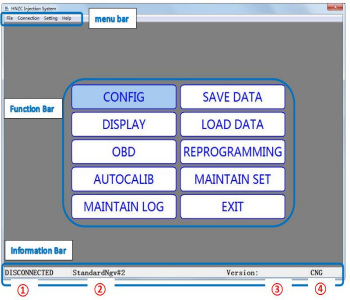
Introduction to the main functions of the software:
Menu bar:
Settings: Language selection (Chinese, English, other customized languages), measurement unit selection (temperature, pressure);
Help: User manual (ECU wiring schematic), about (calibration software version number).
Function Bar:
System parameter configuration: used for configuring and calibrating key system parameters
Status data display: Gas key monitoring parameter display (including unique CVN identification code), oscilloscope display parameter function
System fault diagnosis: used for gas system fault diagnosis, fault code and freeze frame reading and clearing
Gas automatic calibration: used to calibrate the gas used by the engine through static (idle or non idle conditions) calibration after the installation of the conversion kit to meet the gas requirements of the engine (gas calibration effect: idle<non idle conditions)
System maintenance records: used to record customer operations during the system maintenance process
Save configuration data: used to save debugged parameters and backup ECU configuration data
Loading configuration data: Load saved configuration data without recalibration (Information bar ② displays the name of the configuration data file)
System program update: used for firmware upgrade and software update of the controller (information bar ③ displays firmware version number)
Maintenance condition setting: Used to record vehicle installation information for easy system maintenance.
Information bar:
①: Display the connection status between the calibration software and the gas ECU, with "ECU disconnected" or "ECU connected successfully"
②: Display the name of the configuration data file (in the function bar, you can customize the name in the saved configuration data for easy identification of vehicle information)
③: Display firmware version number
④: Display the current fuel usage type of the ECU, "CNG" or "LPG" (fuel type can be modified in the function bar and system parameter configuration)
1. Software installation
2.1 Software Operating Environment
Operating System: Windows XP or higher
RAM memory: 128MB or more
ROM hard drive: 512MB or more
Computer display resolution: above 800 * 600
2.2 Software and debugging line driver installation
2.1 Software Operating Environment
Operating System: Windows XP or higher
RAM memory: 128MB or more
ROM hard drive: 512MB or more
Computer display resolution: above 800 * 600
2.2 Software and debugging line driver installation
Software installation: Double click with the left button and follow the software prompts to complete the installation. During the installation process, the system will ask you which directory to install the program in. We suggest not changing the default directory.
For other functions, please contact our company's business personnel
Popular articles
-
How the CNG Automotive S
Compressed natural gas (CNG) automotive systems
-
What Is CNG Pressure Red
The pressure reducer of natural gas vehicle is
-
Advantages Of CNG Gas V
Compressed natural gas vehicles are vehicles th
-
Reasons For High Gas Con
1. Original vehicle condition A. The tec
-
Differences Between Sing
Characteristics of Gas Single Point Device
-
How To Improve The Power
1. Install ignition advance angle What i
-

How The CNG Gas Vehicle
If you want to know – how does the CNG conversi
-

Advantages And Principle
LPG and CNG are two mainstream alternati





Latest comments
0piece comment
no comments, welcome to comment。